
Getting Started
The dashboard
Overview opens on six cards
Section titled “Overview opens on six cards”In the default layout, Overview starts with four tiles — To assign, Savings rate, Income this month, Spent this month — then, side by side and of equal width, Upcoming cash and Month pace. On a narrow screen, the four tiles line up two by two, then the next two cards stack.
The Upcoming cash card
Section titled “The Upcoming cash card”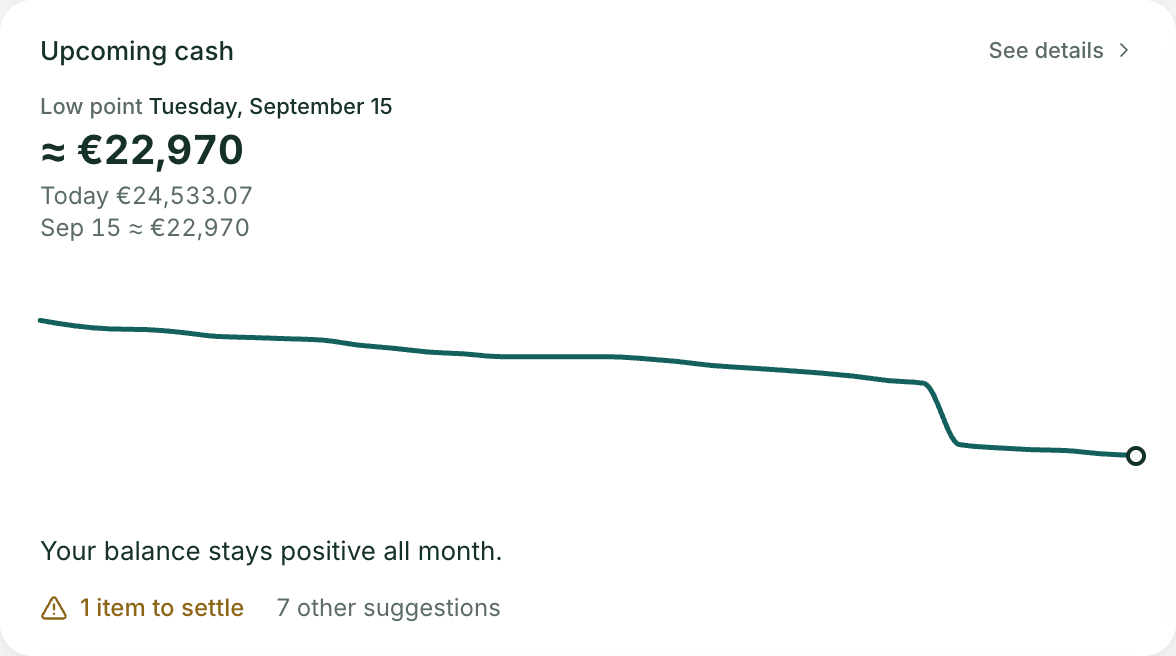
This card is only a summary. The curve, its settings, its markers, its list of movements and its suggestions are on the Upcoming cash page, which See details opens (on a narrow screen, touching the card is enough).
It reads the same figures as the page, for one month and the accounts tracked by the budget, with no settings:
- Low point: the lowest balance of the coming month, in large type, with its date. It is preceded by “≈” (rounded to 10) while the curve takes your usual spending into account, and red if it is below zero.
- Underneath, today’s balance and the balance at the end of the horizon, with its date.
- A mini curve, without axes: the circle marks the low point.
- A sentence: “Your balance stays positive all month.”, or “Your balance goes below zero on …”, or “Your balance is already below zero”. When the month’s biggest income falls after the low point, the sentence says so: “Your balance stays positive all month; the “Salary” income of October 27 arrives the day after the low point.” (or “… arrives 3 days after the low point”).
- The count of suggestions: “N items to settle” in amber for those that call for a decision (balance that could go below zero, account out of date, no income scheduled), then “N other suggestions” for the rest. If there are only suggestions with no urgency, “N suggestions”. All of them can be read, and acted on, on the page.
With no account tracked by the budget, the card says so and the curve will appear as soon as an account is tracked. With no movement at all in the month — no scheduled item, no transaction dated in the future — it gives today’s balance and invites you to add a schedule.
Arca isn’t connected to any bank: the curve only knows what you entered or imported.
Month pace
Section titled “Month pace”Next to cash, Month pace compares what you have spent since the 1st with what you usually had spent by the same date.
- The chart: your running spending for the month as a solid line, with a dot for today; usual running spending in grey, over the whole month.
- The sentence: “As of October 12, you have spent €880, against €760 usually by this date.”, and the gap at the top of the card (“+€120 compared with usual”). The gap is stated, not judged: no red, no amber.
- The daily amount: “To end the month as usual: €26 a day” — what is left of a usual month’s spending, spread over the remaining days. If you have already reached a usual month’s spending, the card says so: “You have already reached a usual month’s spending.”
This is your everyday spending, excluding scheduled items — the card says so next to its title — with the same calculation as the “With your usual spending” line of the Upcoming cash page: the average of your last 12 full calendar months (three at least), without the spending of the payees that your active expense schedules already cover, spread according to the rhythm of your month. A heavy start of the month is therefore not spread as a straight line. The legend says over how many months the average is made (“Usual (average of 11 months)”). With under three months of history, the card says what you have spent this month and notes that the comparison will appear over time.
Unlike the Upcoming cash page, this card has no account setting: it looks at the accounts tracked by the budget.
Customizing
Section titled “Customizing”Cards can be moved, resized or removed from Customize, at the top of Overview; Add puts one more, Export and Import exchange the layout as a file, Reset goes back to the default layout (yours is then lost, Arca asks for confirmation), and Done closes editing. On a narrow screen, cards are stacked one under the other and can’t be moved, resized or removed; Add, Export, Import and Reset remain available: Add in the bar, the other three in the More actions menu.
A layout you save today is kept as it is. A layout saved before October 2, 2026, when the cash forecast on Overview became a summary, is kept but put back in order when it opens: the four tiles at the top, Upcoming cash and Month pace take their place at the top (the last two are added if your layout predates their arrival, on September 30, 2026; a card you had removed is not put back), and your other cards keep their size and column, simply shifted down below that header. Nothing is written to your vault until you change the layout yourself. The former “Balance forecast” (replaced by Upcoming cash) and “Insights” cards no longer exist.
Was this page helpful?
Thanks — noted.